Operator
Who gets flagged
AND and OR make two different rules from the same conditions.
YouVerify Cowork – Case study
Transaction monitoring is the YouVerify product that lets businesses set the rules that flag suspicious transactions. The old builder had many limits and did not show what a compliance analyst needs to know. I redesigned how a rule is built, tested, versioned and watched. It is live now, and compliance teams at our clients are already using it.
Before I drew anything I looked at what users ran into and what was at stake.
User voice
The old builder had many limits, and several parts did not make sense to the people using it. It did not show what a compliance analyst needs to know. These are the five things I took into the work.
With several conditions joined together, people could not tell what a rule would actually do.
A bad input only showed up after several steps, then people hunted for what caused it.
A rule could pass every check and still not do what the person meant.
Nothing linked the setup together, so a rule was hard to review as one thing.
Everything about a rule sat on one long page.
What an analyst said
“I could not tell what a rule would actually do until it had already run.”
What an analyst said
“If one value is wrong I only find out at the end, then I have to dig for the cause.”
What an analyst said
“I have a rule open, a case open and a list open. I keep losing where I am.”
At stake
A misplaced AND or OR changes which transactions get flagged. A wrong threshold changes how much a rule catches. A wrong action changes how suspicious activity is escalated.
So setting up a rule is not filling in a form. It is a chain of connected decisions that tells the system how to read every transaction.
Operator
AND and OR make two different rules from the same conditions.
Threshold
A wrong value changes detection coverage.
Action
The action decides how suspicious activity is escalated.
The challenge
Make complex rules easier to set up without taking away the control compliance teams need.
Then I turned it into questions, and into what a win would look like.
Questions
01
How might we help users understand the logic behind the rules they set?
02
How might we make errors easier to find and correct?
03
How might we connect building, testing and publishing into one experience?
The goal was not fewer clicks. It was less unnecessary thinking, while keeping the decisions that matter.
Success
I picked one task and set the targets before I designed anything: build a rule that checks transaction amount, destination risk and customer PEP status, then raises an alert and opens a case. The Before column is how the old builder performed on it.
| Metric | Before | Design target |
|---|---|---|
| Rule configuration time | 10m 40s | Under 7 minutes |
| Time to understand the configured logic | 100 sec | Under 60 sec |
| Recovery from an invalid input | 70 sec | Under 40 sec |
| Configuration accuracy | No inline check | 90% task success |
| Backtesting usability | One panel, run once | Complete setup without help |
Every decision follows the same path: what users hit, how I thought about it, what I weighed, what I decided, and what it did.
Decision 01
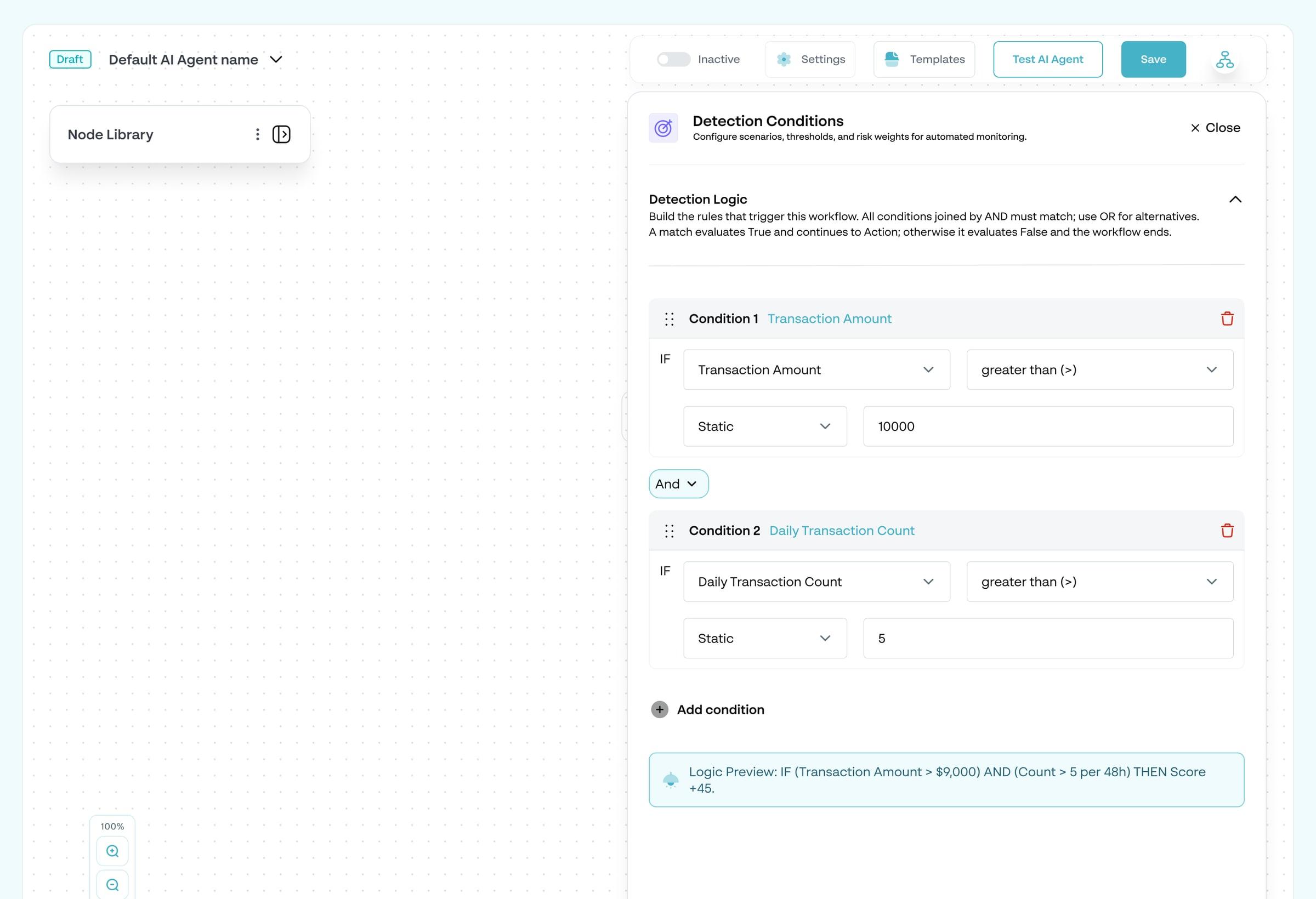
A rule is a sentence: flag a transaction when this, and this, and this. The builder should read it back the same way, while you are still building it.
With several conditions joined together, people could not tell what a rule would actually do.
If a rule can be said in one sentence, an analyst can check it. So the builder should say it back to them while they build.
Beside the conditions, in the same panel, so checking happens while building and not on a separate review screen.
Variables, operators and AND / OR are explicit, and a preview restates the rule as it is set up.
100 sec down to 45 sec to read what a rule does. In testing, people could tell what a rule would do before it ran.
55%Less time
What the logic preview says
Flag when amount is over the limit AND destination is high risk AND customer is a PEP then raise an alert and open a case.
Change one AND to an OR and it becomes a different rule. The preview shows you that before it matters.
Decision 02
A mistake found late is expensive. An invalid input used to send people back through earlier steps to find the cause.
A bad input only showed up after several steps, then people hunted for the decision that caused it.
The earlier and the closer an error shows up, the less there is to undo.
A wrong value would flow on into testing and waste a run, so I stop the rule at the field instead of letting it through.
A non-numeric value in a numeric condition shows an error that says what is wrong and takes you back to it.
70 sec down to 25 sec to fix one bad value. People found the problem at the field and fixed it without hunting for it.
64%Faster
That is not a number.
The error sits next to the value, and you cannot test until it is fixed.
Decision 03
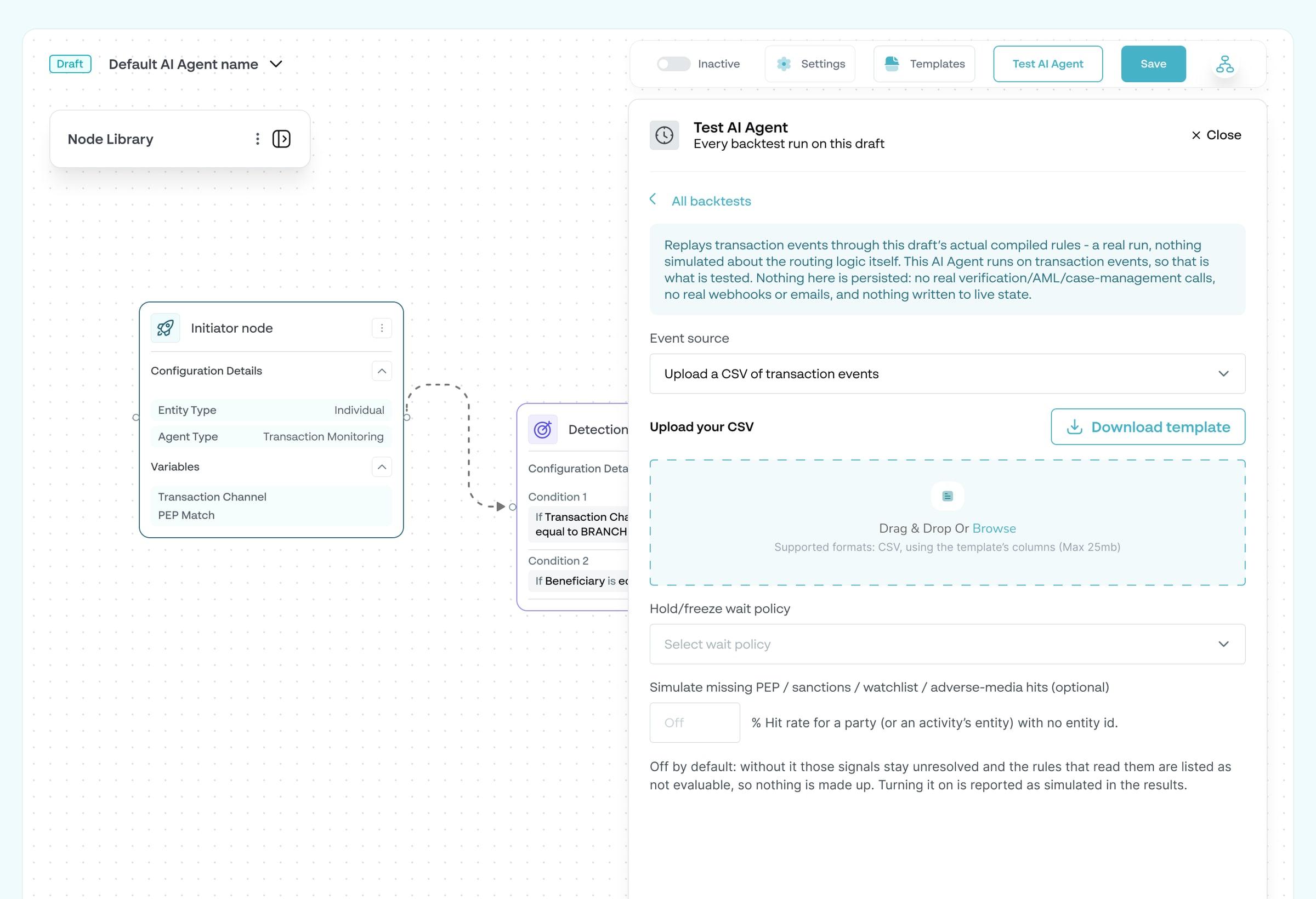
Testing a rule used to be one panel: fill it in, run it, and the result surfaced as a status step. Backtests now have their own place, three clear sources and a record of every run.
Setup, filters and the run all sat in one panel, and a finished run showed up as a status line in the overview.
Rules run on events, so a test should replay events in the order they arrived, not only a list of transactions.
Choosing a source adds a step, but each source carries its own rules: a file, a date range with a row cap, or stored events in arrival order. Nothing touches live data, and simulated screening hits stay optional and off by default.
It opens on a list of earlier runs, each labelled with its source, version and record count. A new backtest starts by choosing a source: CSV, past transactions or stored events.
Active user time for a CSV backtest with a prepared file, system processing not counted. Teams now test a rule before it goes live without asking for help.
3m 20sTo run
The draft rule
A saved run
Decision 04
A rule is built on a canvas, one node at a time, in the order the system reads it.
01
What starts it
02
What it reads
03
What triggers it
04
What it does
05
Who is told
A rule is several decisions, and nothing linked them, so a setup was hard to read back as one thing.
When does it trigger? And what happens when it does?
The stages follow the order the system reads them, so the canvas matches how the rule behaves.
Saving and version publishing close the journey.
People can see when a rule triggers and what happens next.
1 pathLive
Decision 05
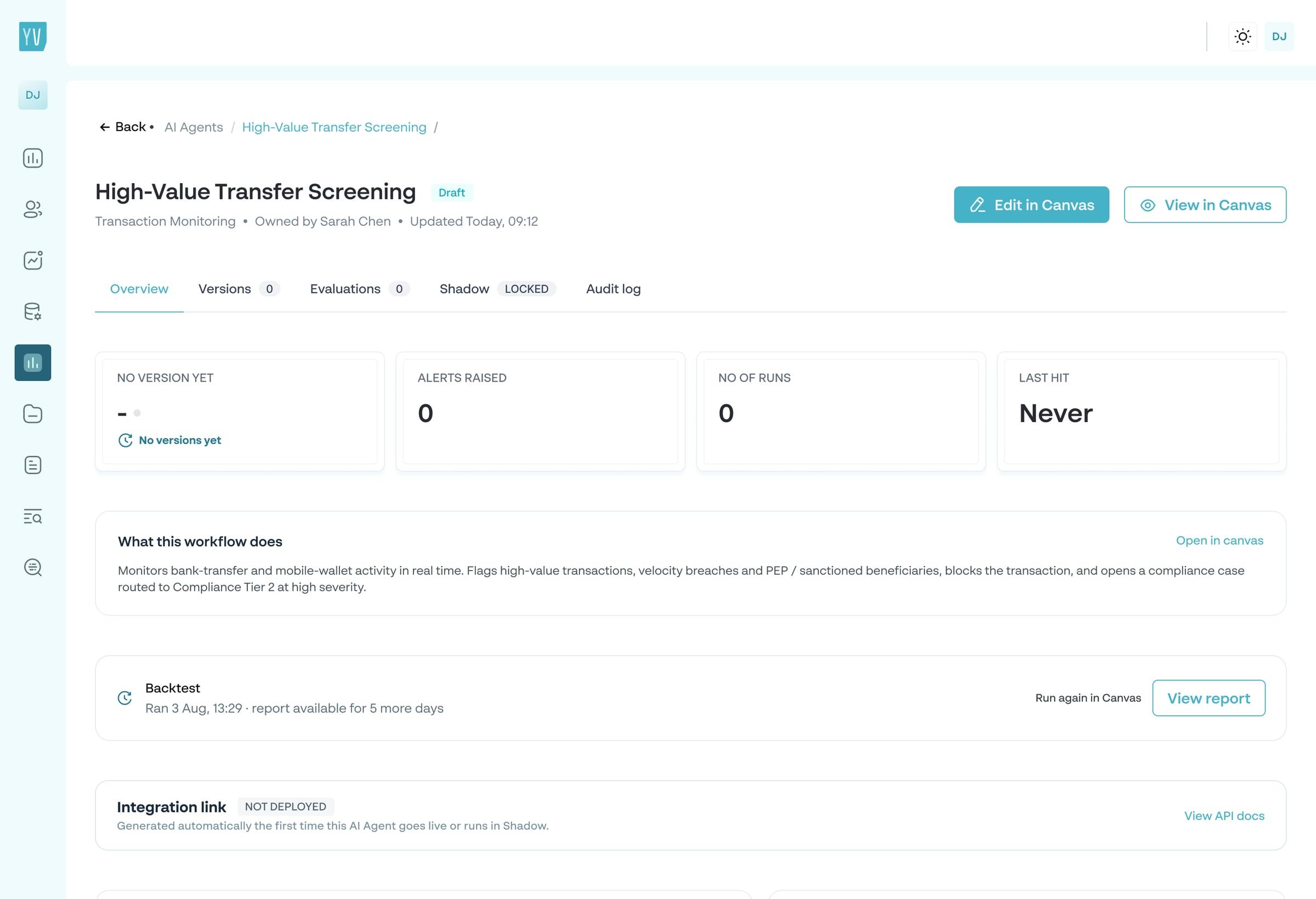
Everything about a rule used to sit on one long page. I pushed to split it into tabs. Each question gets its own place, and the overview stays short.
Before
One long scroll
After
Short page, one question at a time
Everything about a rule sat on one long page.
Nobody should have to scroll to find out what a rule is doing.
The overview shows what the rule does, its latest backtest and recent activity. The depth lives in the tabs.
Overview, Versions, Evaluations, Shadow and Audit log.
Each question is one tab away.
5 tabsLive
Shadow mode
Every published version is kept. You can compare two, or restore an older one. Before a new version replaces the live one, it can run beside it. A shadow never acts. It only logs what it would have decided.
v3
The version making decisions today. Every older version is kept, and any two can be compared.
v4
Runs on the same events as the live version. It never acts. It only logs what it would have decided.
Then you see where the two versions disagree, before anyone is affected.
Evaluations
Each event the rule sees gets an evaluation. Open one and follow the decision node by node, with what went in and what came out.
Comes in
Step 1
Step 2
Step 3
Output
What testing showed, what I traded off, and what I am tracking now.
Comparison
I ran one first-time-user task on both versions: three conditions, alert and case actions, one bad value to fix, and a final review of the setup.
Original
for the whole task
Redesign
for the whole task
Result
faster, about four minutes saved per rule
The biggest gains came from reading the logic, fixing bad inputs and finding your way round the workflow.
| Success metric | Target | Redesign | Assessment |
|---|---|---|---|
| Rule configuration | Under 7 min | 6m 40s | Target met |
| Logic interpretation | Under 60 sec | 45 sec | Target met |
| Error recovery | Under 40 sec | 25 sec | Target met |
Task success and backtesting without help were tested with teams too. Both targets were met.
Impact
All three targets were met. It went live on a Friday and teams are using it now.
Setup
10m 40s down to 6m 40s for the whole task, about four minutes saved on every rule a team sets up.
Logic
Reading what a rule does used to take 100 sec. It now takes 45 sec.
Errors
Finding and fixing a bad value used to take 70 sec. It now takes 25 sec.
Trade-offs
Every one of these had two good answers. This is where I landed, and what it cost.
I chose
Immediate validation and clearer logic, even where it adds a step.
I gave up
The shortest possible flow. A shorter flow is not better if people make more mistakes.
I chose
Keep the advanced setup monitoring teams need, and make it more structured and easier to follow.
I gave up
A simpler interface that would have limited what the product can do.
I chose
AI-assisted variable suggestions that help people explore, with people still reviewing the logic.
I gave up
Hands-off automation. In financial crime, people still need to understand what they apply.
Measures
It is live, so I am tracking these with real teams. Each one has a baseline from the comparison and a way to check it.
Median time to complete a rule, from builder analytics, checked each quarter against the 6m 40s baseline.
Share of rules published without help, from support requests and walkthroughs with teams.
A short check-in with analysts: can they say when their rule will trigger?
Time from an invalid input to a fix, from the same analytics.
Share of new rules backtested before going live, from the run history on the Backtests tab.
What I learned
Collaboration
Compliance work has many owners: analysts, engineers, product and the stakeholders who sign off. I learned to bring each of them in before the design was settled, not after.
Agreeing on the targets first gave everyone one thing to aim at, and it made every later decision easier to defend.
Transaction monitoring is the YouVerify product businesses use to build the rules that flag suspicious transactions. I redesigned how a rule is built, tested, versioned and watched. It is live now and in use by compliance teams at YouVerify’s clients.
Save Bubi. Pick a topic to begin.

Help, I am stuck! Save me?


Bubi is stuck in a cage and he is counting on you. Pick a topic and guess the word. Every wrong letter shakes the cage harder.
Pick a topic